阶段五:微服务项目运维实践进阶
微服务项目部署
部署ruoyi-system微服务
- 登录harbor服务器克隆项目代码
[root@iZ0jl9w52tzprkjq2wtxulZ ~]# yum -y install git
[root@iZ0jl9w52tzprkjq2wtxulZ ~]# git clone https://gitee.com/y_project/RuoYi-Cloud.git
注意事项:
- 修改配置前先备份原文件,尤其是 SSH、Nginx、数据库和 Kubernetes 生产配置。
yum install maven -y注意事项:
- 修改配置前先备份原文件,尤其是 SSH、Nginx、数据库和 Kubernetes 生产配置。
git checkout v3.6.7
cd /data/RuoYi-Cloud
mvn clean package -Dmaven.test.skip=true
注意事项:
- 修改配置前先备份原文件,尤其是 SSH、Nginx、数据库和 Kubernetes 生产配置。
[root@node1 ruoyi-system]# cd /data/RuoYi-Cloud/ruoyi-modules/ruoyi-system
[root@node1 ruoyi-system]# wget https://mirrors.aliyun.com/docker-ce/linux/centos/docker-ce.repo -O /etc/yum.repos.d/docker-ce.repo  && yum -y install docker-ce

#定义启动脚本
[root@node1 ruoyi-system]# vim entrypoint.sh
java -Dspring.cloud.nacos.config.file-extension=yml \
-Dspring.cloud.nacos.discovery.server-addr=nacos-svc:8848 \
-Dspring.cloud.nacos.config.server-addr=nacos-svc:8848 \
-jar /ruoyi-system.jar

#登录仓库

#定义镜像
[root@node1 ruoyi-system]# vim Dockerfile
#定义基础镜像
FROM crpi-u2hnpi6tp166p9nj.cn-beijing.personal.cr.aliyuncs.com/itheima2026/jdk11:latest

COPY target/ruoyi-modules-system.jar /ruoyi-system.jar

COPY ./entrypoint.sh /

EXPOSE 9201

CMD /bin/sh /entrypoint.sh

#镜像构建
[root@node1 ruoyi-system]# docker build -t crpi-u2hnpi6tp166p9nj.cn-beijing.personal.cr.aliyuncs.com/itheima2026/ruoyi-system:v1.0 .

#推送镜像
[root@node1 ruoyi-system]# docker push crpi-u2hnpi6tp166p9nj.cn-beijing.personal.cr.aliyuncs.com/itheima2026/ruoyi-system:v1.0
注意事项:
- 修改配置前先备份原文件,尤其是 SSH、Nginx、数据库和 Kubernetes 生产配置。
# spring配置
spring:
  redis:
    # 连接redis
    host: ry-redis-svc
    port: 6379
    password: 123456
      datasource:
          # 连接MySQL,指定MySQL地址、库名、用户名、密码
          master:
            driver-class-name: com.mysql.cj.jdbc.Driver
            url: jdbc:mysql://mysql-svc:3306/ruoyi?useUnicode=true&characterEncoding=utf8&zeroDateTimeBehavior=convertToNull&useSSL=true&serverTimezone=GMT%2B8
            username: root
            password: 123456
配置详解:
| 需要改的项 | 为什么改 |
|---|---|
host: ry-redis-svc | 替换为已解析到 Ingress 的实际域名。 |
port: 6379 | 对外暴露的 Service 端口;调用方按此端口访问。 |
注意事项:
- 修改配置前先备份原文件,尤其是 SSH、Nginx、数据库和 Kubernetes 生产配置。
YAML 保存位置: ~/k8s-manifests/ruoyi/ry-system.yaml
先在 Kubernetes 管理节点执行:
mkdir -p ~/k8s-manifests/ruoyi
cd ~/k8s-manifests/ruoyi
vi ry-system.yaml
把下方 YAML 全部复制进去;红色字段按当前环境修改;按 Esc 后输入 :wq 保存退出。
apiVersion: apps/v1
kind: Deployment
metadata:
  name: ry-system
  namespace: ruoyi
spec:
  replicas: 1
  selector:
    matchLabels:
      ry: system
  template:
    metadata:
      labels:
        ry: system
    spec:
      imagePullSecrets:
        - name: registry
      containers:
        - name: ry-system
          image: crpi-u2hnpi6tp166p9nj.cn-beijing.personal.cr.aliyuncs.com/itheima2026/ruoyi-system:latest
          ports:
            - containerPort: 9201
          env:
            - name: TZ
              value: Asia/Shanghai
配置详解:
| 需要改的项 | 为什么改 |
|---|---|
namespace: ruoyi | 与实际命名空间一致;使用默认命名空间时可不写。 |
replicas: 1 | 按可用性和资源容量设置副本数。 |
image: crpi-u2hnpi6tp166p9nj.cn-beijing.personal.cr.aliyuncs.com/itheima2026/ruoyi-system:latest | 替换为实际可拉取的镜像地址和版本。 |
注意事项:
- 修改配置前先备份原文件,尤其是 SSH、Nginx、数据库和 Kubernetes 生产配置。
- YAML 缩进不能乱;同级字段要对齐,子字段要多缩进两个空格。
- 资源名称、命名空间、标签选择器要互相对应,否则资源创建了也可能找不到彼此。
- 镜像地址、版本号和拉取权限要确认,否则 Pod 会进入
ImagePullBackOff。
部署ruoyi-auth微服务
[root@node1 ruoyi-auth]# cd /data/RuoYi-Cloud/ruoyi-auth
#定义启动脚本
[root@node1 ruoyi-auth]# vim entrypoint.sh
java -Dspring.cloud.nacos.config.file-extension=yml \
-Dspring.cloud.nacos.discovery.server-addr=nacos-svc:8848 \
-Dspring.cloud.nacos.config.server-addr=nacos-svc:8848 \
-jar /ruoyi-auth.jar

#拷贝时区文件到当前目录
[root@node1 ruoyi-auth]# cp /usr/share/zoneinfo/Asia/Shanghai .

#定义镜像
[root@node1 ruoyi-auth]# vim Dockerfile
#定义基础镜像
FROM harbor.lanqicheng.top/library/jdk11

COPY target/ruoyi-auth.jar /ruoyi-auth.jar

COPY Shanghai  /usr/share/zoneinfo/Asia/Shanghai

COPY ./entrypoint.sh /

EXPOSE 9200

CMD /bin/sh /entrypoint.sh

#镜像构建
[root@node1 ruoyi-auth]# docker build -t crpi-u2hnpi6tp166p9nj.cn-beijing.personal.cr.aliyuncs.com/itheima2026/ruoyi-auth:v1.0 .

#推送镜像
[root@node1 ruoyi-auth]# docker push crpi-u2hnpi6tp166p9nj.cn-beijing.personal.cr.aliyuncs.com/itheima2026/ruoyi-auth:v1.0
注意事项:
- 修改配置前先备份原文件,尤其是 SSH、Nginx、数据库和 Kubernetes 生产配置。
spring:
  redis:
    host: ry-redis-svc
    port: 6379
    password: 123456
配置详解:
| 需要改的项 | 为什么改 |
|---|---|
host: ry-redis-svc | 替换为已解析到 Ingress 的实际域名。 |
port: 6379 | 对外暴露的 Service 端口;调用方按此端口访问。 |
注意事项:
- 修改配置前先备份原文件,尤其是 SSH、Nginx、数据库和 Kubernetes 生产配置。
YAML 保存位置: ~/k8s-manifests/ruoyi/ry-auth.yaml
先在 Kubernetes 管理节点执行:
mkdir -p ~/k8s-manifests/ruoyi
cd ~/k8s-manifests/ruoyi
vi ry-auth.yaml
把下方 YAML 全部复制进去;红色字段按当前环境修改;按 Esc 后输入 :wq 保存退出。
apiVersion: apps/v1
kind: Deployment
metadata:
  name: ry-auth
  namespace: ruoyi
spec:
  replicas: 1
  selector:
    matchLabels:
      ry: auth
  template:
    metadata:
      labels:
        ry: auth
    spec:
      imagePullSecrets:
        - name: registry
      containers:
      - name: ry-auth
        image: crpi-u2hnpi6tp166p9nj.cn-beijing.personal.cr.aliyuncs.com/itheima2026/ruoyi-auth:v1.0
        ports:
        - containerPort: 9200
        env:
        - name: TZ
          value: "Asia/Shanghai"
        readinessProbe:             #定义就绪探针
          tcpSocket:                #通过端口探测
            port: 9200              #端口
          initialDelaySeconds: 30   #容器启动后等待30秒执行探测
          periodSeconds: 3          #执行探测频率为3秒
配置详解:
| 需要改的项 | 为什么改 |
|---|---|
namespace: ruoyi | 与实际命名空间一致;使用默认命名空间时可不写。 |
replicas: 1 | 按可用性和资源容量设置副本数。 |
image: crpi-u2hnpi6tp166p9nj.cn-beijing.personal.cr.aliyuncs.com/itheima2026/ruoyi-auth:v1.0 | 替换为实际可拉取的镜像地址和版本。 |
port: 9200 | 对外暴露的 Service 端口;调用方按此端口访问。 |
注意事项:
- 修改配置前先备份原文件,尤其是 SSH、Nginx、数据库和 Kubernetes 生产配置。
- YAML 缩进不能乱;同级字段要对齐,子字段要多缩进两个空格。
- 资源名称、命名空间、标签选择器要互相对应,否则资源创建了也可能找不到彼此。
- 镜像地址、版本号和拉取权限要确认,否则 Pod 会进入
ImagePullBackOff。
部署gateway网关微服务
[root@node1 ruoyi-gateway]# cd /data/RuoYi-Cloud/ruoyi-gateway
#定义启动脚本
[root@node1 ruoyi-gateway]# vim entrypoint.sh
java -Dspring.cloud.nacos.config.file-extension=yml \
-Dspring.cloud.nacos.discovery.server-addr=nacos-svc:8848 \
-Dspring.cloud.nacos.config.server-addr=nacos-svc:8848 \
-jar /ruoyi-gateway.jar

#拷贝时区文件到当前目录
[root@node1 ruoyi-gateway]# cp /usr/share/zoneinfo/Asia/Shanghai .

#定义镜像
[root@node1 ruoyi-gateway]# vim Dockerfile
#定义基础镜像
FROM harbor.lanqicheng.top/library/jdk11

COPY target/ruoyi-gateway.jar /ruoyi-gateway.jar

COPY Shanghai  /usr/share/zoneinfo/Asia/Shanghai

COPY ./entrypoint.sh /

EXPOSE 9200

CMD /bin/sh /entrypoint.sh

#镜像构建
[root@node1 ruoyi-gateway]# docker build -t crpi-u2hnpi6tp166p9nj.cn-beijing.personal.cr.aliyuncs.com/itheima2026/ruoyi-gateway:v1.0 .

#推送镜像
[root@node1 ruoyi-gateway]# docker push crpi-u2hnpi6tp166p9nj.cn-beijing.personal.cr.aliyuncs.com/itheima2026/ruoyi-gateway:v1.0
注意事项:
- 修改配置前先备份原文件,尤其是 SSH、Nginx、数据库和 Kubernetes 生产配置。
spring:
  redis:
    host: ry-redis-svc
    port: 6379
    password: 123456
配置详解:
| 需要改的项 | 为什么改 |
|---|---|
host: ry-redis-svc | 替换为已解析到 Ingress 的实际域名。 |
port: 6379 | 对外暴露的 Service 端口;调用方按此端口访问。 |
注意事项:
- 修改配置前先备份原文件,尤其是 SSH、Nginx、数据库和 Kubernetes 生产配置。
YAML 保存位置: ~/k8s-manifests/ruoyi/ry-gateway.yaml
先在 Kubernetes 管理节点执行:
mkdir -p ~/k8s-manifests/ruoyi
cd ~/k8s-manifests/ruoyi
vi ry-gateway.yaml
把下方 YAML 全部复制进去;红色字段按当前环境修改;按 Esc 后输入 :wq 保存退出。
apiVersion: apps/v1
kind: Deployment
metadata:
  name: ry-gateway
  namespace: ruoyi
spec:
  replicas: 1
  selector:
    matchLabels:
      ry: gateway
  template:
    metadata:
      labels:
        ry: gateway
    spec:
      imagePullSecrets:
        - name: registry
      containers:
      - name: ry-gateway
        image: crpi-u2hnpi6tp166p9nj.cn-beijing.personal.cr.aliyuncs.com/itheima2026/ruoyi-gateway:v1.0
        ports:
        - containerPort: 8080
        env:
        - name: TZ
          value: "Asia/Shanghai"
        readinessProbe:             #定义就绪探针
          tcpSocket:                #通过端口探测
            port: 8080              #端口
          initialDelaySeconds: 30   #容器启动后等待30秒执行探测
          periodSeconds: 3          #执行探测频率为3秒
---
apiVersion: v1
kind: Service
metadata:
  name: ry-gateway-svc
  namespace: ruoyi
spec:
  selector:
    ry: gateway
  ports:
  - port: 8080
    targetPort: 8080
配置详解:
| 需要改的项 | 为什么改 |
|---|---|
namespace: ruoyi | 与实际命名空间一致;使用默认命名空间时可不写。 |
replicas: 1 | 按可用性和资源容量设置副本数。 |
image: crpi-u2hnpi6tp166p9nj.cn-beijing.personal.cr.aliyuncs.com/itheima2026/ruoyi-gateway:v1.0 | 替换为实际可拉取的镜像地址和版本。 |
port: 8080 | 对外暴露的 Service 端口;调用方按此端口访问。 |
targetPort: 8080 | 必须与容器实际监听端口一致。 |
注意事项:
- 修改配置前先备份原文件,尤其是 SSH、Nginx、数据库和 Kubernetes 生产配置。
- YAML 缩进不能乱;同级字段要对齐,子字段要多缩进两个空格。
- 资源名称、命名空间、标签选择器要互相对应,否则资源创建了也可能找不到彼此。
- 镜像地址、版本号和拉取权限要确认,否则 Pod 会进入
ImagePullBackOff。
部署monitor监控模块
[root@node1 ruoyi-monitor]# cd /data/RuoYi-Cloud/ruoyi-visual/ruoyi-monitor
#定义启动脚本
[root@node1 target]# vim entrypoint.sh
java -Dspring.cloud.nacos.config.file-extension=yml \
-Dspring.cloud.nacos.discovery.server-addr=nacos-svc:8848 \
-Dspring.cloud.nacos.config.server-addr=nacos-svc:8848 \
-jar /ruoyi-monitor.jar

#拷贝时区文件到当前目录
[root@node1 ruoyi-monitor]# cp /usr/share/zoneinfo/Asia/Shanghai .

#定义镜像
[root@node1 ruoyi-monitor]# vim Dockerfile
#定义基础镜像
FROM harbor.lanqicheng.top/library/jdk11

COPY target/ruoyi-visual-monitor.jar /ruoyi-monitor.jar

COPY Shanghai  /usr/share/zoneinfo/Asia/Shanghai

COPY ./entrypoint.sh /

EXPOSE 9100

CMD /bin/sh /entrypoint.sh

#镜像构建
[root@node1 ruoyi-monitor]# docker build -t crpi-u2hnpi6tp166p9nj.cn-beijing.personal.cr.aliyuncs.com/itheima2026/ruoyi-monitor:v1.0 .

#推送镜像
[root@node1 ruoyi-monitor]# docker push crpi-u2hnpi6tp166p9nj.cn-beijing.personal.cr.aliyuncs.com/itheima2026/ruoyi-monitor:v1.0
注意事项:
- 修改配置前先备份原文件,尤其是 SSH、Nginx、数据库和 Kubernetes 生产配置。
# spring
spring:
  security:
    user:
      name: ruoyi
      password: 123456
  boot:
    admin:
      ui:
        title: 若依服务状态监控
注意事项:
- 修改配置前先备份原文件,尤其是 SSH、Nginx、数据库和 Kubernetes 生产配置。
YAML 保存位置: ~/k8s-manifests/ruoyi/ry-monitor.yaml
先在 Kubernetes 管理节点执行:
mkdir -p ~/k8s-manifests/ruoyi
cd ~/k8s-manifests/ruoyi
vi ry-monitor.yaml
把下方 YAML 全部复制进去;红色字段按当前环境修改;按 Esc 后输入 :wq 保存退出。
apiVersion: apps/v1
kind: Deployment
metadata:
  name: ry-monitor
  namespace: ruoyi
spec:
  replicas: 1
  selector:
    matchLabels:
      ry: monitor
  template:
    metadata:
      labels:
        ry: monitor
    spec:
      imagePullSecrets:
        - name: registry
      containers:
      - name: ry-monitor
        image: crpi-u2hnpi6tp166p9nj.cn-beijing.personal.cr.aliyuncs.com/itheima2026/ruoyi-monitor:v1.0
        ports:
        - containerPort: 9100
        env:
        - name: TZ
          value: "Asia/Shanghai"
        readinessProbe:             #定义就绪探针
          tcpSocket:                #通过端口探测
            port: 9100              #端口
          initialDelaySeconds: 30   #容器启动后等待30秒执行探测
          periodSeconds: 3          #执行探测频率为3秒
---
apiVersion: v1
kind: Service
metadata:
  name: monitor-svc
  namespace: ruoyi
spec:
  type: NodePort
  selector:
    ry: monitor
  ports:
  - port: 9100
    targetPort: 9100
    nodePort: 30910
配置详解:
| 需要改的项 | 为什么改 |
|---|---|
namespace: ruoyi | 与实际命名空间一致;使用默认命名空间时可不写。 |
replicas: 1 | 按可用性和资源容量设置副本数。 |
image: crpi-u2hnpi6tp166p9nj.cn-beijing.personal.cr.aliyuncs.com/itheima2026/ruoyi-monitor:v1.0 | 替换为实际可拉取的镜像地址和版本。 |
port: 9100 | 对外暴露的 Service 端口;调用方按此端口访问。 |
targetPort: 9100 | 必须与容器实际监听端口一致。 |
nodePort: 30910 | 集群外通过 NodeIP:NodePort 访问时才需要改。 |
注意事项:
- 修改配置前先备份原文件,尤其是 SSH、Nginx、数据库和 Kubernetes 生产配置。
- YAML 缩进不能乱;同级字段要对齐,子字段要多缩进两个空格。
- 资源名称、命名空间、标签选择器要互相对应,否则资源创建了也可能找不到彼此。
- 镜像地址、版本号和拉取权限要确认,否则 Pod 会进入
ImagePullBackOff。
部署 ruoyi-ui前端
- 修改ruoyi-ui连接gateway的地址并进行代码编译
#进入到前端代码目录
[root@node1 ruoyi-ui]# /data/RuoYi-Cloud/ruoyi-ui

#安装前端代码构建工具
[root@node1 ruoyi-ui]# yum install npm  -y
#设置阿里镜像站进行依赖安装
[root@node1 ruoyi-ui]# npm install --registry=https://registry.npmmirror.com

#强制Node.js使用旧版本的OpenSSL库,以解决与新版本Node.js中加密库不兼容的问题
[root@node1 ruoyi-ui]# export NODE_OPTIONS=--openssl-legacy-provider

#前端代码编译
[root@node1 ruoyi-ui]# npm run build:prod
注意事项:
- 修改配置前先备份原文件,尤其是 SSH、Nginx、数据库和 Kubernetes 生产配置。
[root@node1 ruoyi-ui]# cp /usr/share/zoneinfo/Asia/Shanghai .
[root@node1 ruoyi-ui]# vim Dockerfile
FROM swr.cn-north-4.myhuaweicloud.com/ddn-k8s/docker.io/nginx:1.28.0
COPY ./dist/ /usr/share/nginx/html/
RUN rm -rf /etc/nginx/conf.d/default.conf \
 && chown -R nginx.nginx /usr/share/nginx/html/
COPY Shanghai  /usr/share/zoneinfo/Asia/Shanghai
ENV TZ="Asia/Shanghai"

#构建镜像
[root@node1 ruoyi-ui]# docker build -t crpi-u2hnpi6tp166p9nj.cn-beijing.personal.cr.aliyuncs.com/itheima2026/ruoyi-ui:v1.0 .

#推送镜像
[root@node1 ruoyi-ui]# docker push  crpi-u2hnpi6tp166p9nj.cn-beijing.personal.cr.aliyuncs.com/itheima2026/ruoyi-ui:v1.0
注意事项:
- 修改配置前先备份原文件,尤其是 SSH、Nginx、数据库和 Kubernetes 生产配置。
YAML 保存位置: ~/k8s-manifests/ruoyi/nginx-conf.yaml
先在 Kubernetes 管理节点执行:
mkdir -p ~/k8s-manifests/ruoyi
cd ~/k8s-manifests/ruoyi
vi nginx-conf.yaml
把下方 YAML 全部复制进去;红色字段按当前环境修改;按 Esc 后输入 :wq 保存退出。
apiVersion: v1
kind: ConfigMap
metadata:
  name: nginx-conf
  namespace: ruoyi
data:
  default.conf: |
    server {
        listen       80;
        server_name  _;

        location / {
            root   /usr/share/nginx/html;
            try_files $uri $uri/ /index.html;
            index  index.html index.htm;
        }

        location /prod-api/ {
            proxy_set_header Host $http_host;
            proxy_set_header X-Real-IP $remote_addr;
            proxy_set_header REMOTE-HOST $remote_addr;
            proxy_set_header X-Forwarded-For $proxy_add_x_forwarded_for;
            proxy_pass http://ry-gateway-svc:8080/;  # 网关地址
        }
    }
配置详解:
| 需要改的项 | 为什么改 |
|---|---|
namespace: ruoyi | 与实际命名空间一致;使用默认命名空间时可不写。 |
注意事项:
- 修改配置前先备份原文件,尤其是 SSH、Nginx、数据库和 Kubernetes 生产配置。
- YAML 缩进不能乱;同级字段要对齐,子字段要多缩进两个空格。
- 资源名称、命名空间、标签选择器要互相对应,否则资源创建了也可能找不到彼此。
- 改完 Nginx 后先执行
nginx -t检查语法,再 reload,避免站点直接不可用。
YAML 保存位置: ~/k8s-manifests/ruoyi/ry-ui.yaml
先在 Kubernetes 管理节点执行:
mkdir -p ~/k8s-manifests/ruoyi
cd ~/k8s-manifests/ruoyi
vi ry-ui.yaml
把下方 YAML 全部复制进去;红色字段按当前环境修改;按 Esc 后输入 :wq 保存退出。
apiVersion: apps/v1
kind: Deployment
metadata:
  name: ry-ui
  namespace: ruoyi
spec:
  selector:
    matchLabels:
      ry: ui
  template:
    metadata:
      labels:
        ry: ui
    spec:
      imagePullSecrets:
        - name: registry
      containers:
      - name: ry-ui
        image: crpi-u2hnpi6tp166p9nj.cn-beijing.personal.cr.aliyuncs.com/itheima2026/ruoyi-ui:v1.0
        ports:
        - containerPort: 80
        env:
        - name: TZ
          value: Asia/Shanghai
        volumeMounts:
        - name: nginx-conf
          mountPath: /etc/nginx/conf.d/default.conf
          subPath: default.conf
      volumes:
      - name: nginx-conf
        configMap:
          name: nginx-conf
---
apiVersion: v1
kind: Service
metadata:
  name: ry-ui-svc
  namespace: ruoyi
spec:
  type: NodePort
  selector:
    ry: ui
  ports:
  - port: 80
    targetPort: 80
---
apiVersion: networking.k8s.io/v1
kind: Ingress
metadata:
  name: ry-ui-ingress
  namespace: ruoyi
spec:
  ingressClassName: alb
  rules:
  - host: ruoyi.lanqicheng.top
    http:
      paths:
      - path: /
        pathType: Prefix
        backend:
          service:
            name: ry-ui-svc
            port:
              number: 80
配置详解:
| 需要改的项 | 为什么改 |
|---|---|
namespace: ruoyi | 与实际命名空间一致;使用默认命名空间时可不写。 |
image: crpi-u2hnpi6tp166p9nj.cn-beijing.personal.cr.aliyuncs.com/itheima2026/ruoyi-ui:v1.0 | 替换为实际可拉取的镜像地址和版本。 |
port: 80 | 对外暴露的 Service 端口;调用方按此端口访问。 |
targetPort: 80 | 必须与容器实际监听端口一致。 |
host: ruoyi.lanqicheng.top | 替换为已解析到 Ingress 的实际域名。 |
注意事项:
- 修改配置前先备份原文件,尤其是 SSH、Nginx、数据库和 Kubernetes 生产配置。
- YAML 缩进不能乱;同级字段要对齐,子字段要多缩进两个空格。
- 资源名称、命名空间、标签选择器要互相对应,否则资源创建了也可能找不到彼此。
- 镜像地址、版本号和拉取权限要确认,否则 Pod 会进入
ImagePullBackOff。
YAML 保存位置: ~/k8s-manifests/ruoyi/ry-ui-ingress.yaml
先在 Kubernetes 管理节点执行:
mkdir -p ~/k8s-manifests/ruoyi
cd ~/k8s-manifests/ruoyi
vi ry-ui-ingress.yaml
把下方 YAML 全部复制进去;红色字段按当前环境修改;按 Esc 后输入 :wq 保存退出。
apiVersion: networking.k8s.io/v1
kind: Ingress
metadata:
  name: ry-ui-ingress
  namespace: ruoyi
  annotations:
    alb.ingress.kubernetes.io/listen-ports: '[{"HTTP":80},{"HTTPS":443}]'
    alb.ingress.kubernetes.io/ssl-redirect: "true"
spec:
  ingressClassName: alb
  tls:
    - hosts:
        - ruoyi.lanqicheng.top
      secretName: secret1770191442553   # ← 关键:绑定证书
  rules:
    - host: ruoyi.lanqicheng.top
      http:
        paths:
          - path: /
            pathType: Prefix
            backend:
              service:
                name: ry-ui-svc
                port:
                  number: 80
配置详解:
| 需要改的项 | 为什么改 |
|---|---|
namespace: ruoyi | 与实际命名空间一致;使用默认命名空间时可不写。 |
secretName: secret1770191442553 | 替换为集群中已创建的 Secret 名称。 |
host: ruoyi.lanqicheng.top | 替换为已解析到 Ingress 的实际域名。 |
注意事项:
- 修改配置前先备份原文件,尤其是 SSH、Nginx、数据库和 Kubernetes 生产配置。
- YAML 缩进不能乱;同级字段要对齐,子字段要多缩进两个空格。
- 资源名称、命名空间、标签选择器要互相对应,否则资源创建了也可能找不到彼此。
微服务项目CICD
<cite doc-id="GBCgwxYFhiWQC3klEzQcXep8nRb" file-type="wiki" title="阶段三:Kubernetes基于Jenkins+Gitlab实现CICD" type="doc"></cite>
2.1 创建代码仓库并推送代码
- 创建代码仓库
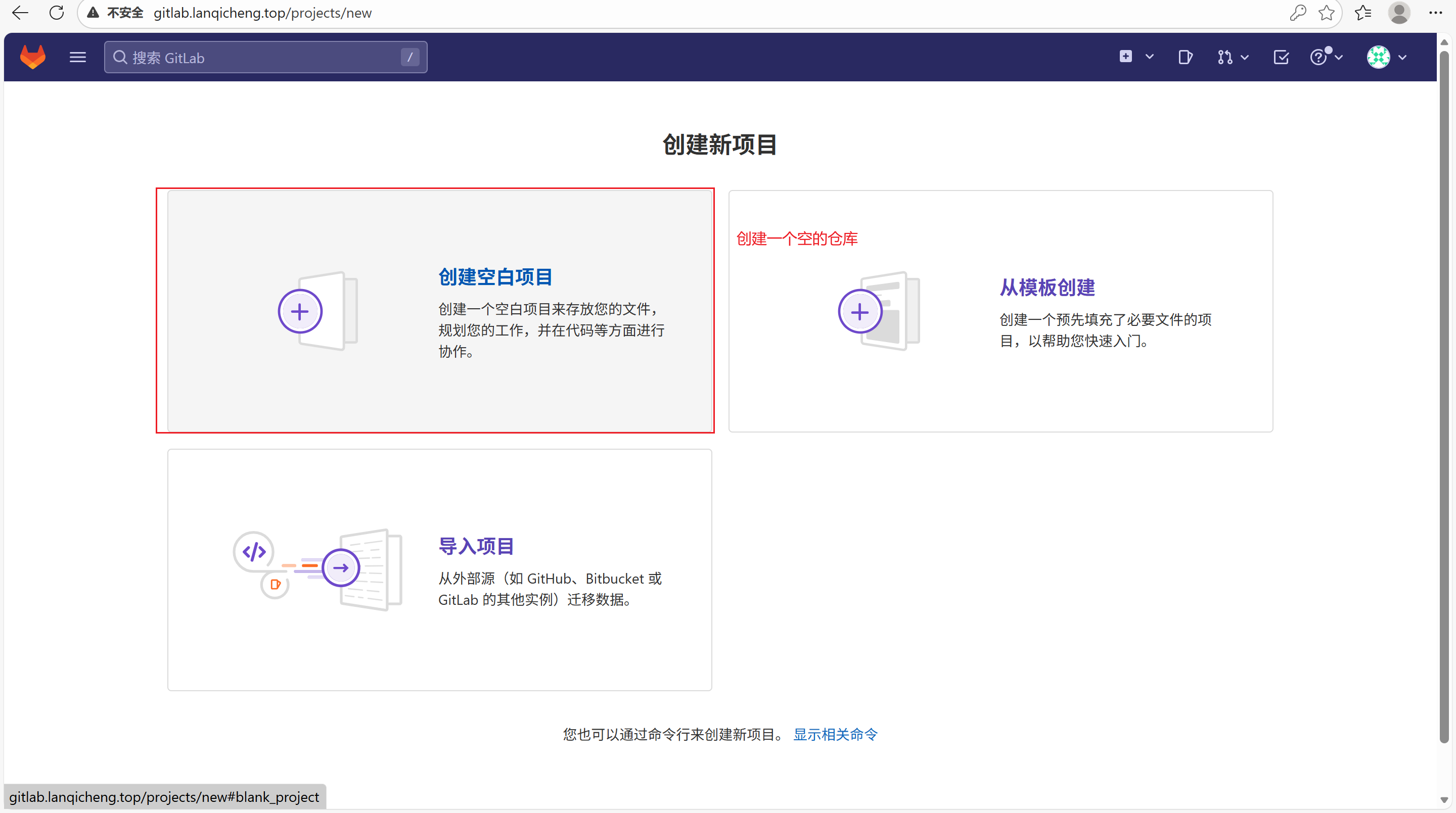
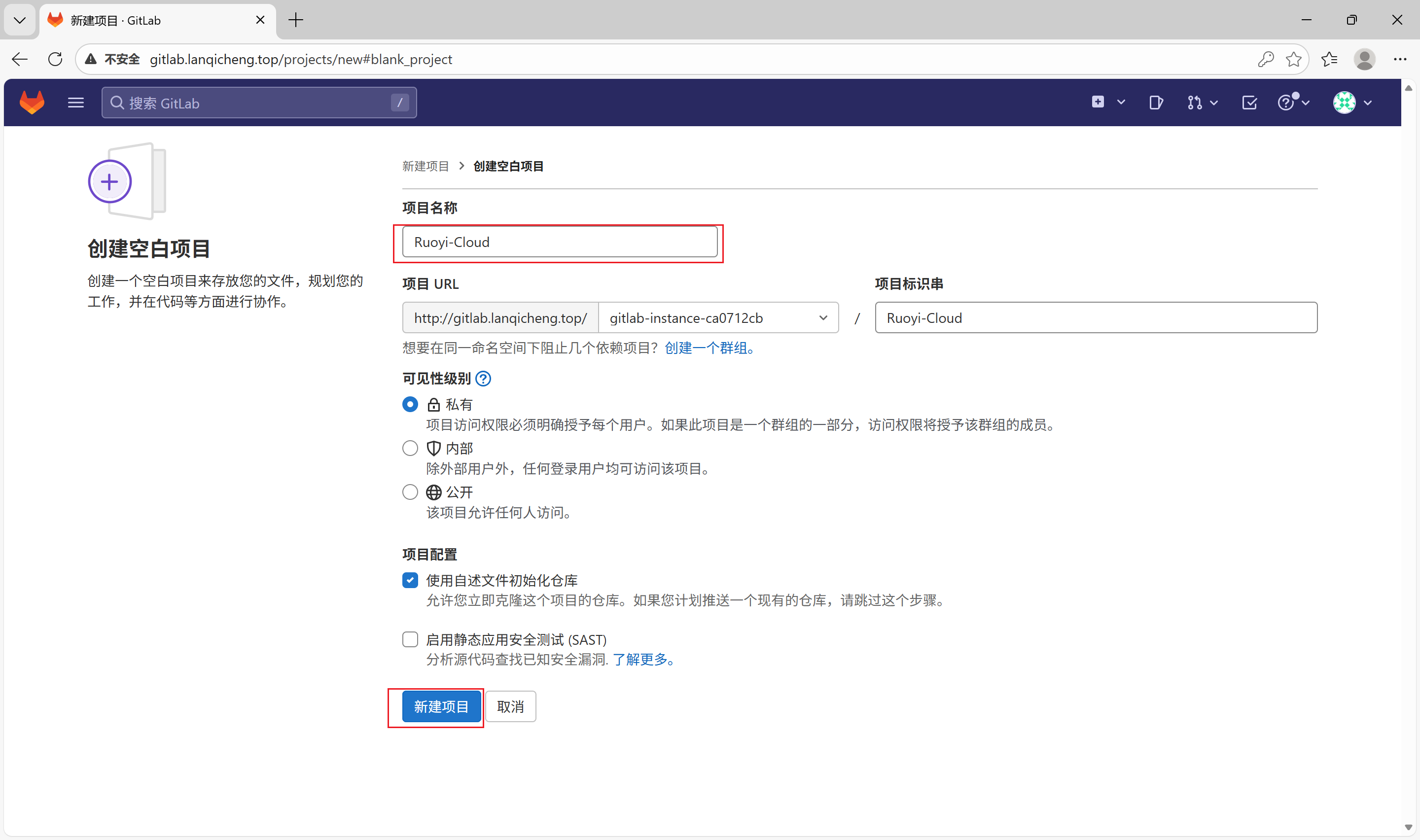
- 代码初始化并配置微服务启动脚本和Dockerfile镜像定义文件
[root@master01 ~]# git clone https://gitee.com/y_project/RuoYi-Cloud.git
[root@master01 RuoYi-Cloud]# git checkout v3.6.7
#把隐藏文件都出来,删除源仓库.git配置目录
[root@node1 RuoYi-Cloud]# ls -lhA
总用量 48K
drwxr-xr-x  2 root root 4.0K 10月  4 16:48 bin
drwxr-xr-x  7 root root  129 10月  4 16:48 docker
drwxr-xr-x  8 root root  163 10月  4 16:48 .git         #删除
drwxr-xr-x  2 root root   25 10月  4 16:48 .github      #删除
-rw-r--r--  1 root root  698 10月  4 16:48 .gitignore
-rw-r--r--  1 root root 1.1K 10月  4 16:48 LICENSE
-rw-r--r--  1 root root  13K 10月  4 16:48 pom.xml
-rw-r--r--  1 root root 9.3K 10月  4 16:48 README.md
drwxr-xr-x  3 root root   45 10月  4 16:48 ruoyi-api
drwxr-xr-x  4 root root   85 12月 17 14:33 ruoyi-auth
drwxr-xr-x 11 root root 4.0K 10月  4 16:48 ruoyi-common
drwxr-xr-x  4 root root   85 12月 17 14:33 ruoyi-gateway
drwxr-xr-x  6 root root   93 10月  4 16:48 ruoyi-modules
drwxr-xr-x  8 root root 4.0K 10月  5 06:49 ruoyi-ui
drwxr-xr-x  3 root root   42 10月  4 16:48 ruoyi-visual
drwxr-xr-x  2 root root  106 10月  4 16:48 sql

#删除旧仓库版本信息
[root@node1 RuoYi-Cloud]# rm -rf .git .github

#初始化本地仓库并上传项目
[root@node1 RuoYi-Cloud]# git init

#添加当前目录文件到本地仓库
[root@node1 RuoYi-Cloud]# git add .

[root@node1 RuoYi-Cloud]# git commit -m '诺依项目初始化'

#添加远程仓库地址
[root@node1 RuoYi-Cloud]# git remote add origin http://gitlab.lanqicheng.top/gitlab-instance-ca0712cb/ruoyi-cloud.git

#推送本地仓库代码到远程仓库
[root@node1 RuoYi-Cloud]# git push -u origin --all
注意事项:
- 修改配置前先备份原文件,尤其是 SSH、Nginx、数据库和 Kubernetes 生产配置。
2.2 更新kubectl镜像的config配置文件
- 开通阿里云ACK的APIServer远程地址并把config复制出来(需要开通ACK)
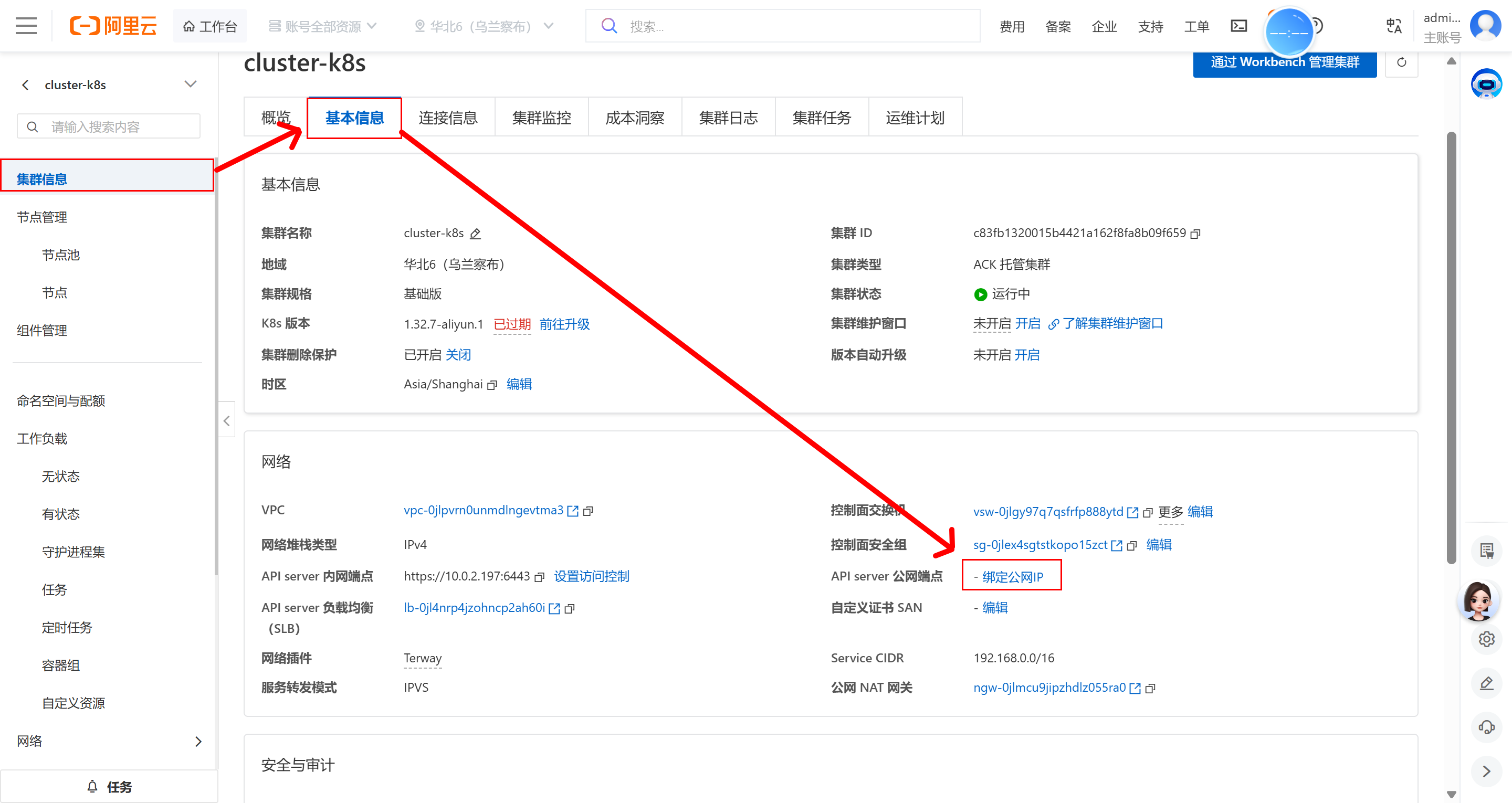
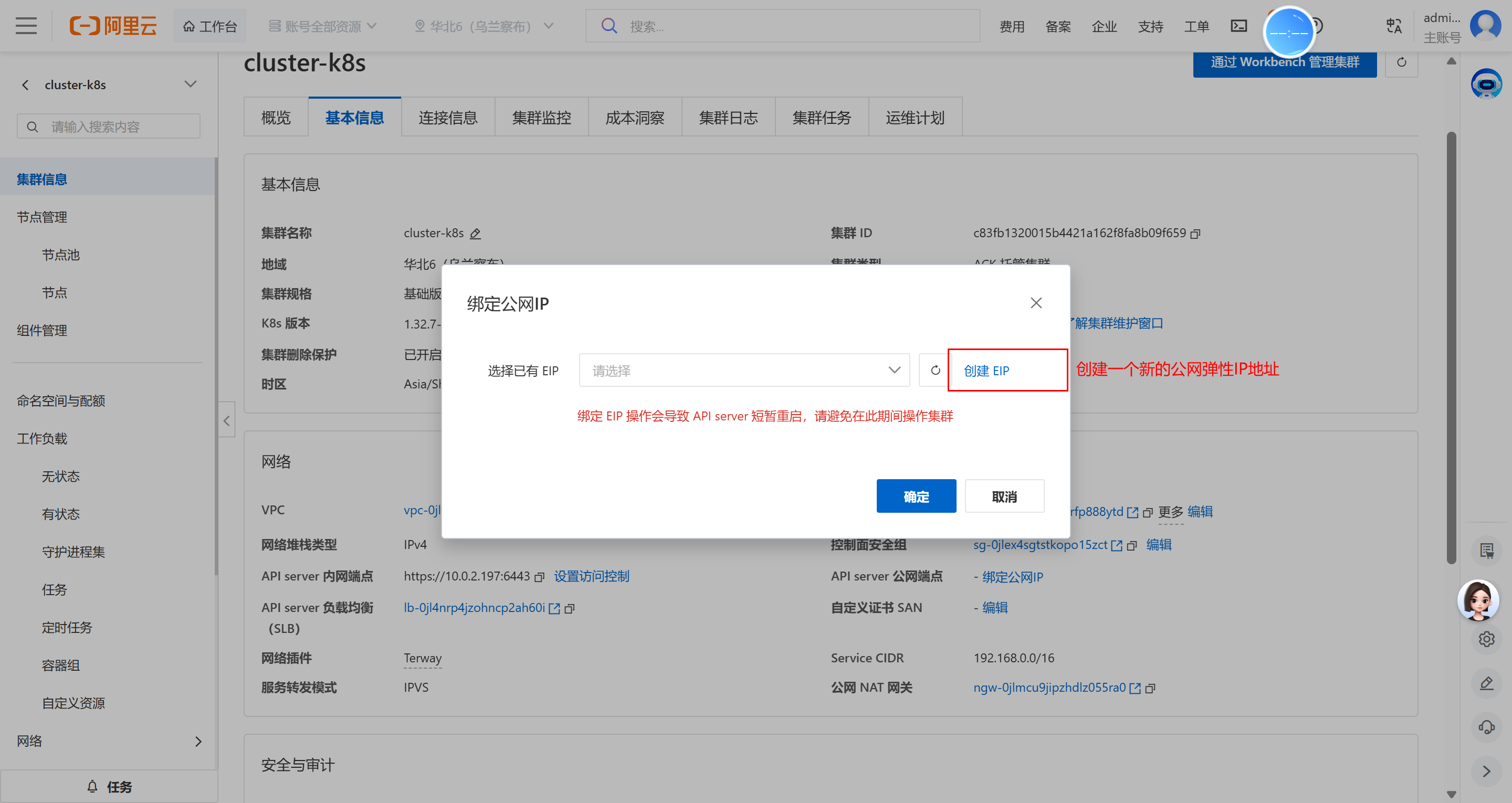
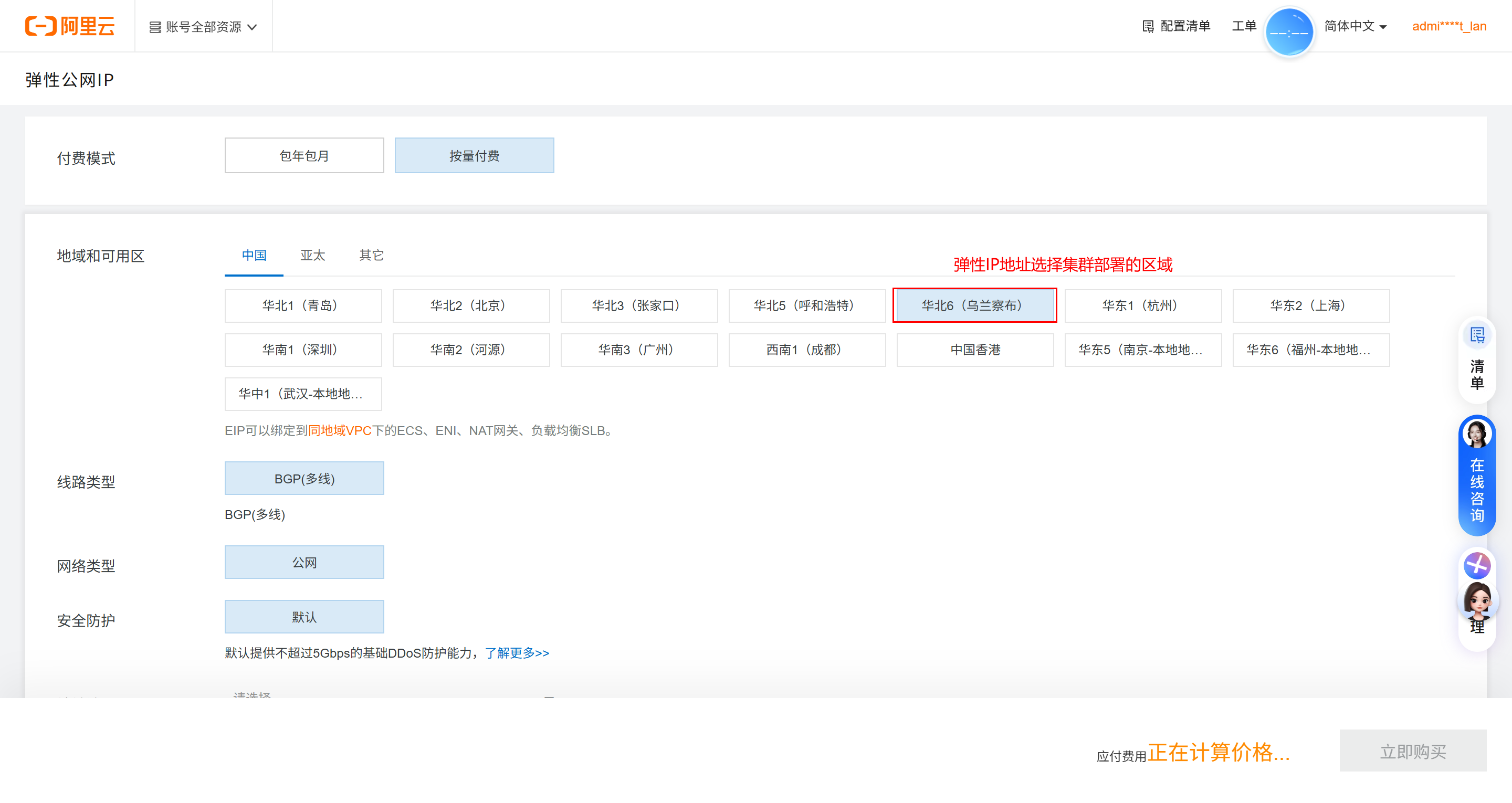
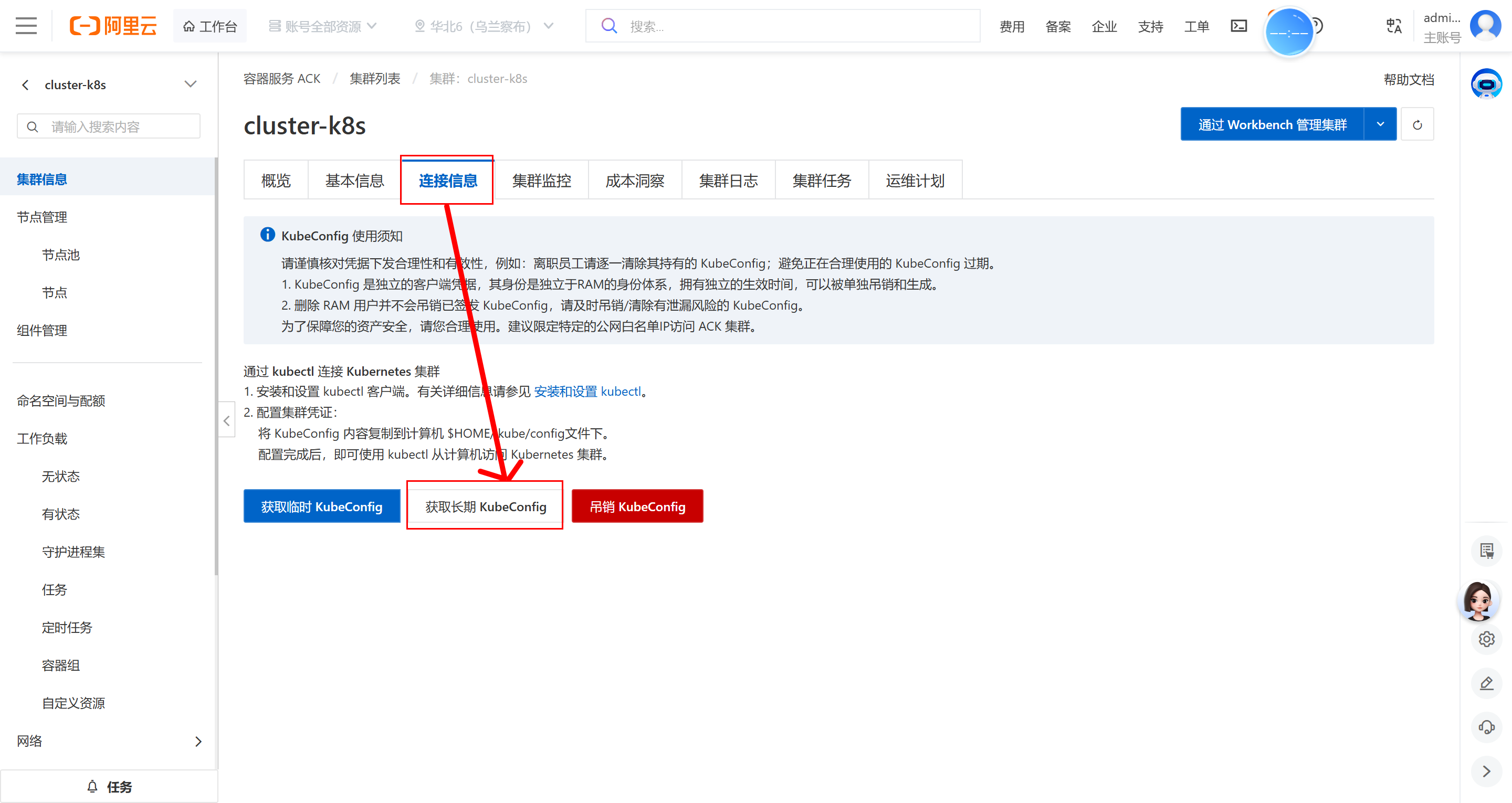
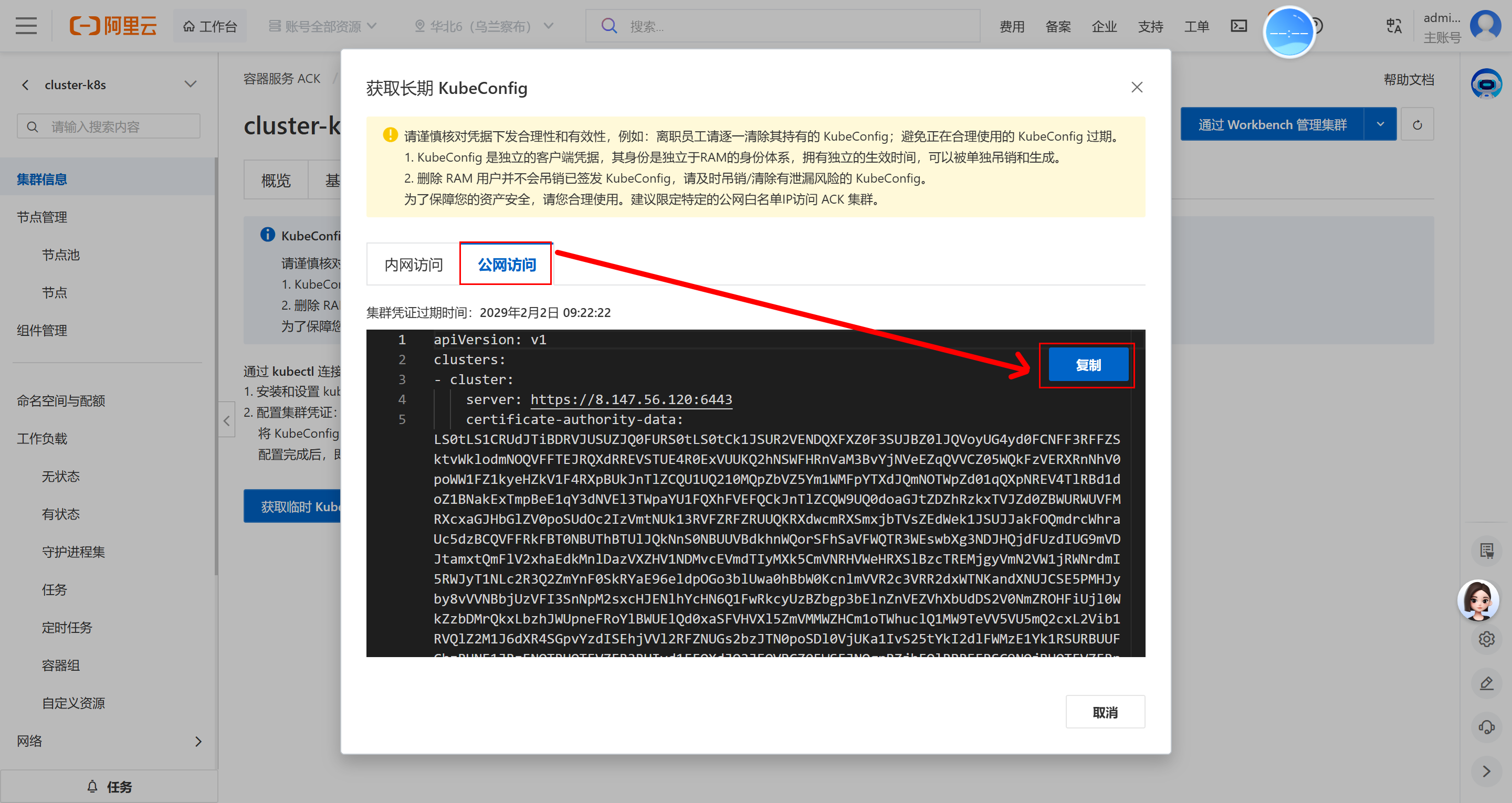
- 构建阿里云ACK kubectl镜像
[root@node1 data]# cp -a kubectl kubectl-aliyun
[root@node1 data]# cd kubectl-aliyun
#更新config访问集群信息,把阿里云的kubeconfig更新到config文件里面
[root@node1 kubectl-aliyun]# vim config
[root@node1 kubectl-aliyun]# docker build -t harbor.lanqicheng.top/library/kubectl:aliyun .
[root@node1 kubectl-aliyun]# docker push harbor.lanqicheng.top/library/kubectl:aliyun
注意事项:
- 修改配置前先备份原文件,尤其是 SSH、Nginx、数据库和 Kubernetes 生产配置。
2.3 创建Jenkins流水线实现服务CICD
- 创建一个流水线项目
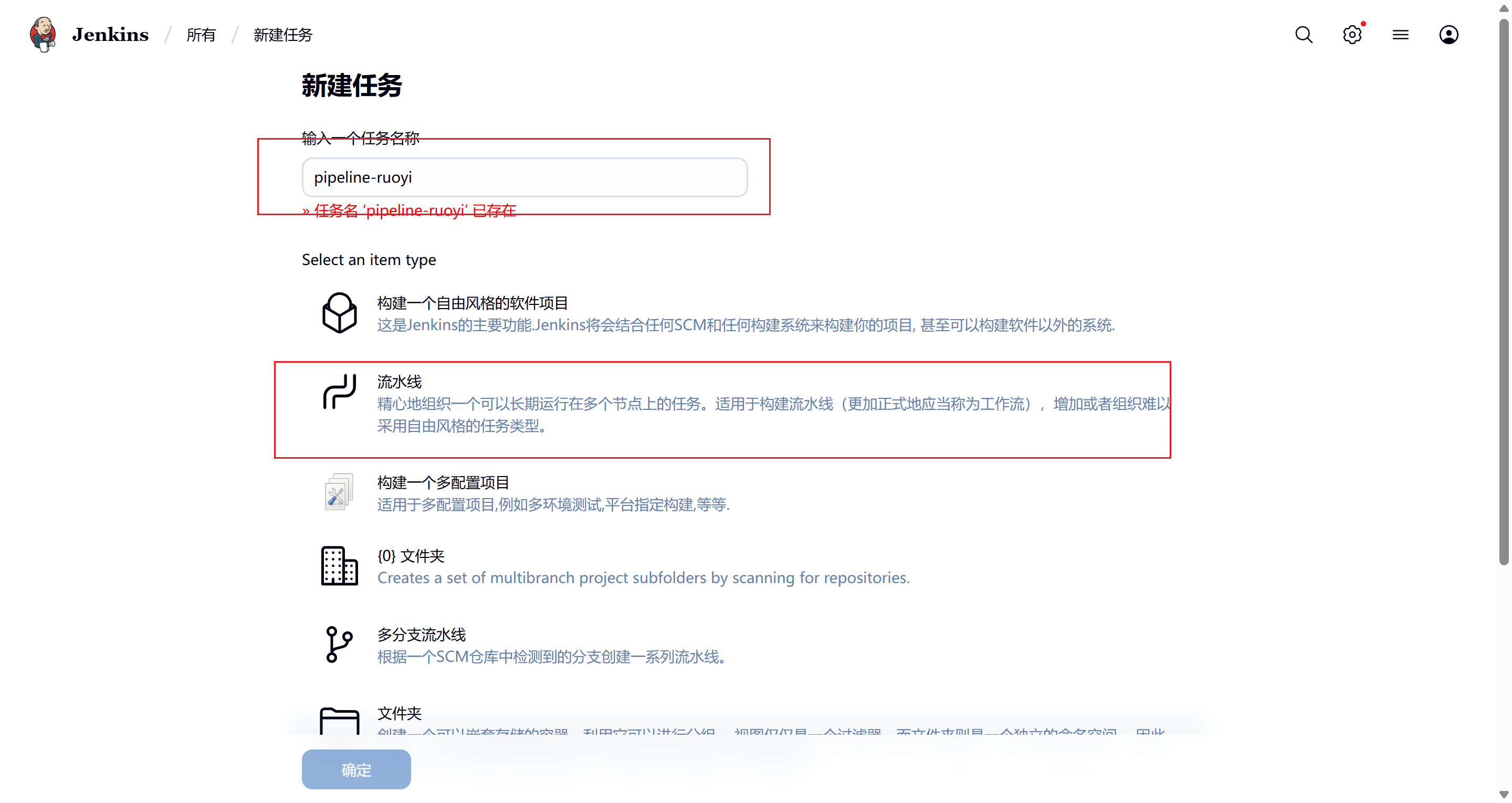
- 编写流水线(过程和前面项目相似)
pipeline {
agent {
kubernetes {
cloud 'kubernetes'
yaml """
可复制 YAML:
YAML 保存位置: ~/k8s-manifests/default/pod.yaml
先在 Kubernetes 管理节点执行:
mkdir -p ~/k8s-manifests/default
cd ~/k8s-manifests/default
vi pod.yaml
把下方 YAML 全部复制进去;红色字段按当前环境修改;按 Esc 后输入 :wq 保存退出。
apiVersion: v1
kind: Pod
spec:
  containers:
    - name: maven
      image: harbor.lanqicheng.top/library/maven:3.8.6
      command: ["cat"]  # 使用cat命令来保持容器运行
      tty: true         # 为容器分配一个tty终端,方便通过 kubectl exec 进入容器
      env:
        - name: TZ
          value: Asia/Shanghai
      volumeMounts:
        - name: maven-data   # 挂载maven的缓存目录
          mountPath: /root/.m2
    - name: nodejs
      image: harbor.lanqicheng.top/library/nodejs:16.20.2
      command: ["cat"]  # 使用cat命令来保持容器运行
      tty: true         # 为容器分配一个tty终端,方便通过 kubectl exec 进入容器
      env:
        - name: TZ
          value: Asia/Shanghai
    - name: buildkitd
      image: harbor.lanqicheng.top/library/buildkitd:v0.17.1
      command: ["cat"]
      tty: true
      env:
        - name: TZ
          value: Asia/Shanghai
      volumeMounts:                      # 挂载volume
        - name: containerd-socket        # 挂载containerd-socket卷到buildkitd容器
          mountPath: /run/containerd/containerd.sock
        - name: buildkit-socket          # 挂载buildkitd-socket卷到buildkitd容器
          mountPath: /run/buildkit/buildkitd.sock
    - name: kubectl
      image: harbor.lanqicheng.top/library/kubectl:aliyun
      command: ["cat"]
      tty: true
      env:
        - name: TZ
          value: Asia/Shanghai
  volumes:
    - name: maven-data
      persistentVolumeClaim:
        claimName: maven-data
    - name: containerd-socket    # 挂载containerd.sock到buildkitd容器来让buildkitd可以访问到containerd提供的容器服务,例如:push镜像
      hostPath:
        path: /run/containerd/containerd.sock
    - name: buildkit-socket      # 挂载buildkitd.sock到buildkitd容器来让buildkitd可以访问到服务端进行镜像构建
      hostPath:
        path: /run/buildkit/buildkitd.sock
"""
        }
    }
    stages {
        stage('拉取代码') {
            steps {
                container('maven') {
                    checkout scmGit(branches: [[name: '*/master']], extensions: [], userRemoteConfigs: [[credentialsId: '2dd487f4-c3fc-4cb9-91ef-777f23179f82', url: 'http://gitlab.lanqicheng.top/root/ruoyi-cloud.git']])
                    sh 'pwd && ls -l'
                }
            }
        }
        stage('检测变更模块') {
            steps {
                script {
                    // def 定义局部变量,git diff --name-only HEAD~1 获取最近一次git提交的变更文件
                    def changedFiles = sh(script: 'git diff --name-only HEAD~1', returnStdout: true).trim().split('\n')
                    // env定义全局变量,changedFiles.collect { ... } 遍历变更文件列表
                    // file.startsWith(...) 用于检查文件路径是否以特定字符串开头,从而判断文件属于哪个路径
                    // return 当文件路径匹配特定字符串时,定义返回对应的模块名称(例如 'Gateway'、'System' 等)
                    env.CHANGED_MODULES = changedFiles.collect { file ->
                        if (file.startsWith('ruoyi-gateway')) return 'Gateway'
                        if (file.startsWith('ruoyi-modules/ruoyi-system')) return 'System'
                        if (file.startsWith('ruoyi-auth')) return 'Auth'
                        if (file.startsWith('ruoyi-visual/ruoyi-monitor')) return 'Monitor'
                        if (file.startsWith('ruoyi-ui')) return 'UI'
                    }.unique().join(',')
                    // 打印变更的模块
                    echo "Changed modules: ${env.CHANGED_MODULES}"
                }
            }
        }
        stage('代码编译') {
              steps {
                script {
                  def modules = env.CHANGED_MODULES.split(',')

                  if (modules.contains('UI')) {
                    container('nodejs') {
                      sh '''
                        cd ruoyi-ui
                        npm install --registry=https://registry.npmmirror.com
                        export NODE_OPTIONS=--openssl-legacy-provider
                        npm run build:prod
                      '''
                    }
                  } else {
                    container('maven') {
                      sh 'mvn clean package -Dmaven.test.skip=true'
                    }
                  }
                }
              }
            }
        stage('镜像标签') {
            steps {
                container('maven') {
                    script {
                        env.BuildTime = sh(returnStdout: true, script: "date +%Y%m%d_%H%M").trim()
                    }
                }
            }
        }
        stage('镜像构建') {
            steps {
                script {
                    def modules = env.CHANGED_MODULES.split(',')
                    def tasks = [:]
                    if (modules.contains('Gateway')) {
                        tasks["构建Gateway镜像"] = {
                            container('buildkitd') {
                                sh 'nerdctl login --username=administ_lan -p Lan12345678 crpi-u2hnpi6tp166p9nj.cn-beijing.personal.cr.aliyuncs.com'
                                sh 'ls -lh ruoyi-gateway/target'
                                sh "cd ruoyi-gateway && nerdctl build  -t crpi-u2hnpi6tp166p9nj.cn-beijing.personal.cr.aliyuncs.com/itheima2026/ruoyi-gateway:v1.0.${BuildTime} ."
                                sh "nerdctl push crpi-u2hnpi6tp166p9nj.cn-beijing.personal.cr.aliyuncs.com/itheima2026/ruoyi-gateway:v1.0.${BuildTime}"
                                sh "nerdctl rmi crpi-u2hnpi6tp166p9nj.cn-beijing.personal.cr.aliyuncs.com/itheima2026/ruoyi-gateway:v1.0.${BuildTime}"
                            }
                        }
                    }
                    if (modules.contains('System')) {
                        tasks["构建System镜像"] = {
                            container('buildkitd') {
                                sh 'nerdctl login --username=administ_lan -p Lan12345678 crpi-u2hnpi6tp166p9nj.cn-beijing.personal.cr.aliyuncs.com'
                                sh "cd ruoyi-modules/ruoyi-system && nerdctl build  -t crpi-u2hnpi6tp166p9nj.cn-beijing.personal.cr.aliyuncs.com/itheima2026/ruoyi-system:v1.0.${BuildTime} ."
                                sh "nerdctl push crpi-u2hnpi6tp166p9nj.cn-beijing.personal.cr.aliyuncs.com/itheima2026/ruoyi-system:v1.0.${BuildTime}"
                                sh "nerdctl rmi crpi-u2hnpi6tp166p9nj.cn-beijing.personal.cr.aliyuncs.com/itheima2026/ruoyi-system:v1.0.${BuildTime}"
                            }
                        }
                    }
                    if (modules.contains('Auth')) {
                        tasks["构建Auth镜像"] = {
                            container('buildkitd') {
                                sh 'nerdctl login --username=administ_lan -p Lan12345678 crpi-u2hnpi6tp166p9nj.cn-beijing.personal.cr.aliyuncs.com'
                                sh "cd ruoyi-auth && nerdctl build  -t crpi-u2hnpi6tp166p9nj.cn-beijing.personal.cr.aliyuncs.com/itheima2026/ruoyi-auth:v1.0.${BuildTime} ."
                                sh "nerdctl push crpi-u2hnpi6tp166p9nj.cn-beijing.personal.cr.aliyuncs.com/itheima2026/ruoyi-auth:v1.0.${BuildTime}"
                                sh "nerdctl rmi crpi-u2hnpi6tp166p9nj.cn-beijing.personal.cr.aliyuncs.com/itheima2026/ruoyi-auth:v1.0.${BuildTime}"
                            }
                        }
                    }
                    if (modules.contains('Monitor')) {
                        tasks["构建Monitor镜像"] = {
                            container('buildkitd') {
                                sh 'nerdctl login --username=administ_lan -p Lan12345678 crpi-u2hnpi6tp166p9nj.cn-beijing.personal.cr.aliyuncs.com'
                                sh "cd ruoyi-visual/ruoyi-monitor && nerdctl build  -t crpi-u2hnpi6tp166p9nj.cn-beijing.personal.cr.aliyuncs.com/itheima2026/ruoyi-monitor:v1.0.${BuildTime} ."
                                sh "nerdctl push crpi-u2hnpi6tp166p9nj.cn-beijing.personal.cr.aliyuncs.com/itheima2026/ruoyi-monitor:v1.0.${BuildTime}"
                                sh "nerdctl rmi crpi-u2hnpi6tp166p9nj.cn-beijing.personal.cr.aliyuncs.com/itheima2026/ruoyi-monitor:v1.0.${BuildTime}"
                            }
                        }
                    }
                    if (modules.contains('UI')) {
                        tasks["构建UI镜像"] = {
                            container('buildkitd') {
                                sh 'nerdctl login --username=administ_lan -p Lan12345678 crpi-u2hnpi6tp166p9nj.cn-beijing.personal.cr.aliyuncs.com'
                                sh "cd ruoyi-ui && nerdctl build  -t crpi-u2hnpi6tp166p9nj.cn-beijing.personal.cr.aliyuncs.com/itheima2026/ruoyi-ui:v1.0.${BuildTime} ."
                                sh "nerdctl push crpi-u2hnpi6tp166p9nj.cn-beijing.personal.cr.aliyuncs.com/itheima2026/ruoyi-ui:v1.0.${BuildTime}"
                                sh "nerdctl rmi crpi-u2hnpi6tp166p9nj.cn-beijing.personal.cr.aliyuncs.com/itheima2026/ruoyi-ui:v1.0.${BuildTime}"
                            }
                        }
                    }
                    // parallel 并行执行任务列表中的所有任务
                    parallel tasks
                }
            }
        }
        stage('部署应用') {
            steps {
                script {
                    def modules = env.CHANGED_MODULES.split(',')
                    def tasks = [:]
                    if (modules.contains('Gateway')) {
                        tasks["部署Gateway"] = {
                            container('kubectl') {
                                sh "kubectl --kubeconfig=/root/config  set image deployment/ry-gateway  ry-gateway=crpi-u2hnpi6tp166p9nj.cn-beijing.personal.cr.aliyuncs.com/itheima2026/ruoyi-gateway:v1.0.${env.BuildTime} -n ruoyi"

                            }
                        }
                    }
                    if (modules.contains('System')) {
                        tasks["部署System"] = {
                            container('kubectl') {
                                sh "kubectl --kubeconfig=/root/config  set image deployment/ry-system ry-system=crpi-u2hnpi6tp166p9nj.cn-beijing.personal.cr.aliyuncs.com/itheima2026/ruoyi-system:v1.0.${env.BuildTime} -n ruoyi"
                            }
                        }
                    }
                    if (modules.contains('Auth')) {
                        tasks["部署Auth"] = {
                            container('kubectl') {
                               sh "kubectl --kubeconfig=/root/config  set image deployment/ry-auth ry-auth=crpi-u2hnpi6tp166p9nj.cn-beijing.personal.cr.aliyuncs.com/itheima2026/ruoyi-auth:v1.0.${env.BuildTime} -n ruoyi"
                            }
                        }
                    }
                    if (modules.contains('Monitor')) {
                        tasks["部署Monitor"] = {
                            container('kubectl') {
                                sh "kubectl --kubeconfig=/root/config  set image deployment/ry-monitor ry-monitor=crpi-u2hnpi6tp166p9nj.cn-beijing.personal.cr.aliyuncs.com/itheima2026/ruoyi-monitor:v1.0.${env.BuildTime} -n ruoyi"
                            }
                        }
                    }
                    if (modules.contains('UI')) {
                        tasks["部署UI"] = {
                            container('kubectl') {
                               sh "kubectl --kubeconfig=/root/config  set image deployment/ry-ui ry-ui=crpi-u2hnpi6tp166p9nj.cn-beijing.personal.cr.aliyuncs.com/itheima2026/ruoyi-ui:v1.0.${env.BuildTime} -n ruoyi"
                            }
                        }
                    }
                    // parallel 并行执行任务列表中的所有任务
                    parallel tasks
                }
            }
        }
    }
}
配置详解:
| 需要改的项 | 为什么改 |
|---|---|
image: harbor.lanqicheng.top/library/maven:3.8.6 | 替换为实际可拉取的镜像地址和版本。 |
image: harbor.lanqicheng.top/library/nodejs:16.20.2 | 替换为实际可拉取的镜像地址和版本。 |
image: harbor.lanqicheng.top/library/buildkitd:v0.17.1 | 替换为实际可拉取的镜像地址和版本。 |
image: harbor.lanqicheng.top/library/kubectl:aliyun | 替换为实际可拉取的镜像地址和版本。 |
注意事项:
- 修改配置前先备份原文件,尤其是 SSH、Nginx、数据库和 Kubernetes 生产配置。
- YAML 缩进不能乱;同级字段要对齐,子字段要多缩进两个空格。
- 资源名称、命名空间、标签选择器要互相对应,否则资源创建了也可能找不到彼此。
- 镜像地址、版本号和拉取权限要确认,否则 Pod 会进入
ImagePullBackOff。
同步说明
本文由飞书云文档同步生成。涉及命令、SQL、配置示例时,请以飞书源文档和实际环境执行结果为准。